
How to Plan Verse and Chorus Visuals for an AI Music Video
Plan verse and chorus visuals for an AI music video. Learn how to develop a clear visual arc and describe changing moods in Sondo creation workflow.
A good music video does more than put images to a song. It gives the music a visual story, with scenes that change as the song unfolds.
When a song starts quietly and builds into a powerful chorus, the visuals should reflect that progression. If every shot uses the same setting, movement, and framing, the video can feel flat. Changes in scenery, body language, and camera angles help the visuals follow the music.
The key to planning an AI music video is to understand how the song develops and use that as a guide for your visuals. You don't need a complicated storyline. A clear idea, a few recurring details, and a natural progression from verse to chorus are often enough.
1. Listen to the Song Before Planning Scenes
Before writing prompts, listen to the entire song. Pay attention to changes in the vocals, instruments, tempo, and mood.
On your second listen, note the moments that stand out. The verse might feel intimate, while the chorus becomes more energetic. A particular lyric might also shift the mood or reveal something important. These moments can help you decide what the audience should see.
For a song about finding confidence, the video could begin with a character sitting alone in a dimly lit room and move toward a brighter, more open setting as the chorus arrives.
The visuals don't need to illustrate every lyric literally. Focus on the overall feeling and choose scenes that support it.
2. Build the Video Around One Main Idea
A music video is easier to follow when its scenes share a common thread. This could be a character's personal journey, a recurring location, or a small detail that appears throughout the video.
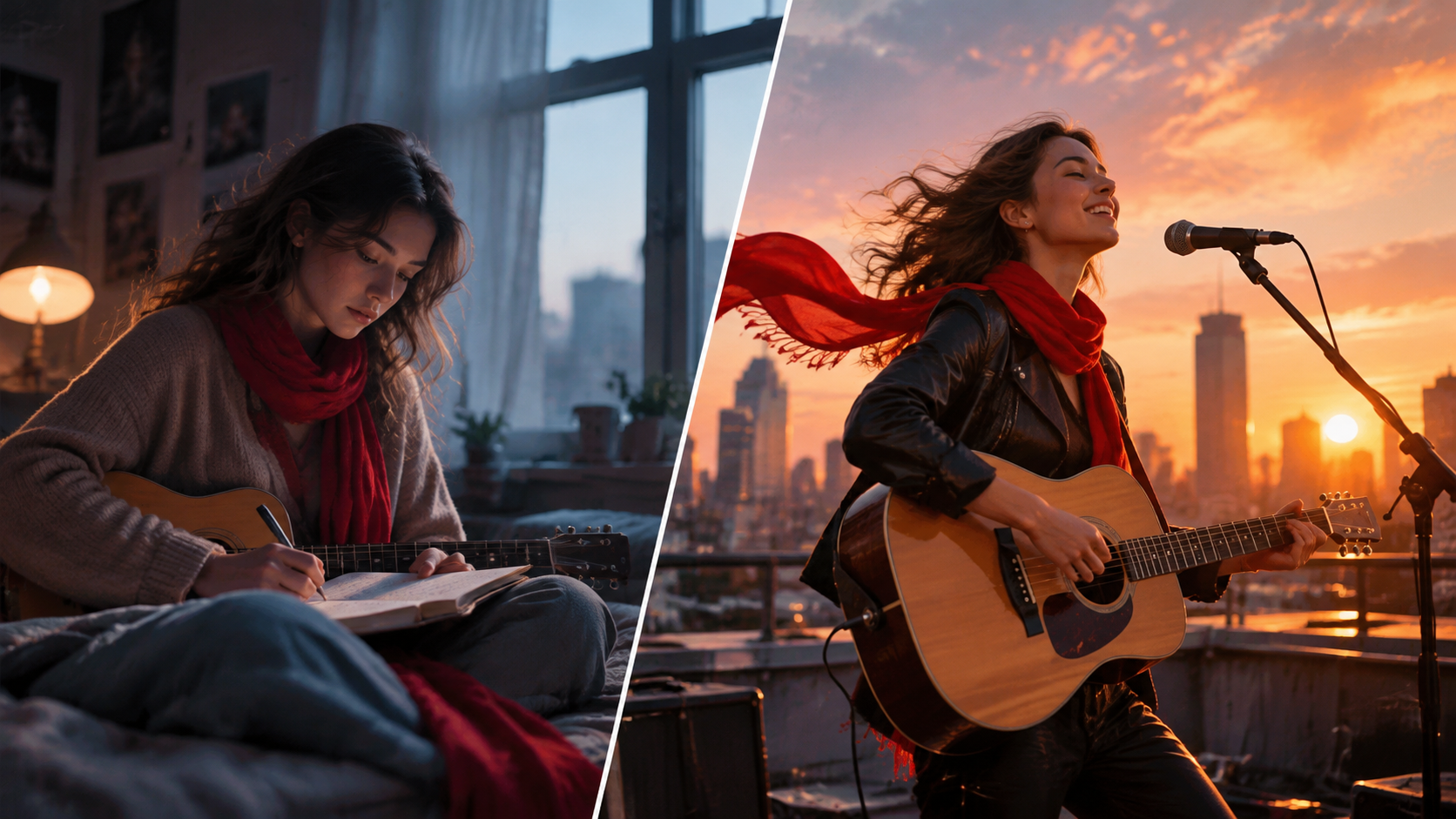
For example, a music video about finding confidence could follow a musician from a quiet apartment to a rooftop overlooking the city. A red scarf appears in both settings, connecting the opening and ending.
This gives your music video storytelling a clear direction. The apartment introduces the character's mood, the journey shows a change, and the rooftop provides a natural ending.
Each shot should contribute to the story or reinforce the song's mood. Keep the main character's appearance, outfit, and other defining details consistent so the scenes feel like parts of the same video.
3. Use the Verses to Set the Scene
Verses often tell the story through smaller details. They introduce people, places, and feelings before the chorus brings them together.
Use these sections to show what the character's life looks like and what they might be going through. Small actions can be more effective than a series of dramatic events.
In the musician story, the character sits beside a window, folds a note, and picks up a red scarf before leaving the apartment. These simple actions establish a quiet, reflective mood and give the audience a reason to follow the character.
Match the camera work to the song, too. A close-up can capture a subtle expression, while a slow camera movement can make a quiet scene feel more intimate.
Avoid packing too many actions into a short verse. A few connected shots usually work better than several unrelated scenes.
4. Let the Chorus Change Something
When the chorus arrives, give the visuals a reason to feel different. That doesn't always mean faster cuts, bigger movements, or brighter colors. The right change depends on the song.
For an uplifting chorus, the musician might leave the apartment and step onto the rooftop. The open sky, wider shots, and more confident body language contrast with the enclosed opening scenes.
For a softer chorus, the change might be more subtle: the character finally looks up, faces the camera, or lets go of the note they've been holding.
If the chorus repeats later in the song, revisit familiar imagery while adding a new detail. The musician might move farther across the rooftop or look out over the city for the first time.
Keep the familiar elements, but let the character or situation move forward. This makes repeated sections feel intentional rather than repetitive.
5. Turn Your Visual Plan into a Sondo Prompt
Once you have a basic idea, you can use the Sondo music video creation workflow to develop it into a video.
Upload your song and add a reference photo for the main character. In the Description field, explain the story, settings, visual style, and how you want the scenes to develop as the music progresses. Choose 16:9 for a landscape video or 9:16 for a vertical video, then select Generate Script.
6. Check That the Scenes Match the Music
After generating the script, read it while listening to the song. Don't just check whether the scenes look good on paper. Make sure they fit the music.
Use the following checklist:
The opening: Establishes the character and the mood.
The verses: Introduce details that help the story make sense.
The chorus: Creates a noticeable change that suits the music.
Repeated sections: Revisit familiar scenes with enough variation to keep the video interesting.
Avoid unnecessary location changes, complicated actions, and details that appear without explanation. Simplify anything that makes the story harder to follow.
For more precise framing and scene transitions, refine the camera movements in your storyboard to better match each shot's mood and action.
Verse and chorus labels are useful planning cues, but the final visuals should follow the actual structure and mood of your song. Review the generated video with the audio to make sure the transitions feel natural.
Give Your Music Video a Clear Direction
You don't need a detailed screenplay to plan an engaging AI music video. Start by identifying how the song feels at the beginning and how that feeling changes by the end.
Use the verses to introduce the situation, let the chorus develop the central idea, and carry a few recognizable details throughout the video. With a clear visual direction and a little refinement in Sondo, you can create a music video that feels connected to the song rather than a collection of unrelated shots.